Features
Attack chain mapping
What is an attack chain?
An attack chain is a sequence of connected vulnerabilities that gives an attacker a path from an initial foothold to a specific objective. Each vulnerability in the chain is a step: one weakness is exploited to reach a position that makes the next weakness exploitable.
Traditional vulnerability management uses spreadsheets or pentest report PDFs. If a server has access to an internal network where a misconfigured service sits, and that service can reach a database with customer records, those three findings form an attack chain. The medium-severity vulnerability at the start is now the most important thing to fix, even though its individual score doesn’t reflect that.
Building attack chains forces you to think about your environment the way an attacker would, rather than treating each finding as an isolated ticket to fix. It also changes how you prioritise remediation: fixing the link that breaks the most paths is often more efficient than addressing each issue independently. This is what the Attack Surface Center calls minimal viable remediation.
Understand your exposure the way attackers do
Attack chains show you how individual vulnerabilities connect into a route to compromise. Rather than treating each finding in isolation, you get a clear picture of which vulnerabilities are truly critical because of where they sit in the chain.
Visual exploit paths
See how a series of vulnerabilities chain together from initial access through to a target asset, displayed as an interactive graph.
Relationship mapping
Understand the connections between assets and vulnerabilities, not just what’s broken, but how each issue relates to the broader environment.
Minimal viable remediation
Identify the smallest set of fixes that breaks the most attack paths, so your team can focus effort where it has the greatest impact.
Team collaboration
Share attack chains with your team to align on remediation priorities and track progress against each node in the chain.
Interactive attack chain graphs
Our attack chain mapping feature offers dynamic network flow graphs that make complex vulnerability relationships intuitive. Create a visual representation of your exploit paths and share them with your team to enhance understanding and support collaborative remediation.
- Dynamic graph layout: Nodes and links are automatically arranged to make relationships clear. Drag, zoom, and explore your attack surface interactively.
- Multiple node types: Select from vulnerabilities, risks, or create custom nodes to represent any element of your environment within the chain.
- Automatic relationship detection: The system creates visual relationships between connected nodes, highlighting potential attack paths as you build.
Create and manage attack chains
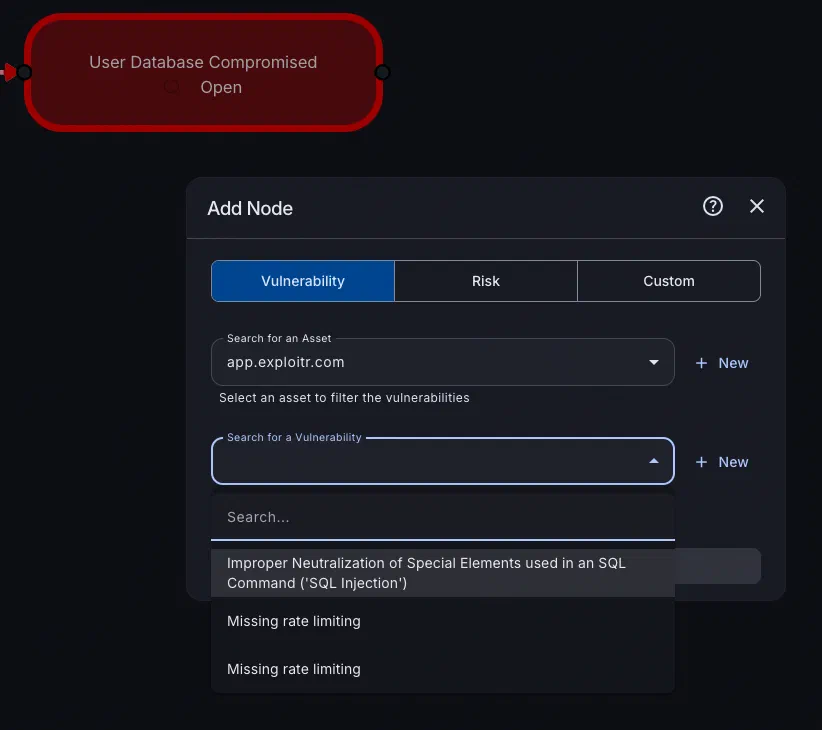
Build attack chains by selecting assets and vulnerabilities from your existing inventory. Customise the chain with additional nodes and links as your understanding of the environment evolves.
- Build from your inventory: Pull vulnerabilities and assets directly from the Attack Surface Center - no re-entering data or context switching.
- Customise freely: Add, remove, or relink nodes at any point. Drag and drop to connect nodes or use the context menu to create links between existing ones.
- Custom nodes: Not every element maps to a tracked vulnerability. Create custom nodes to represent business context, attacker objectives, or hypothetical steps.
Collaborate on remediation
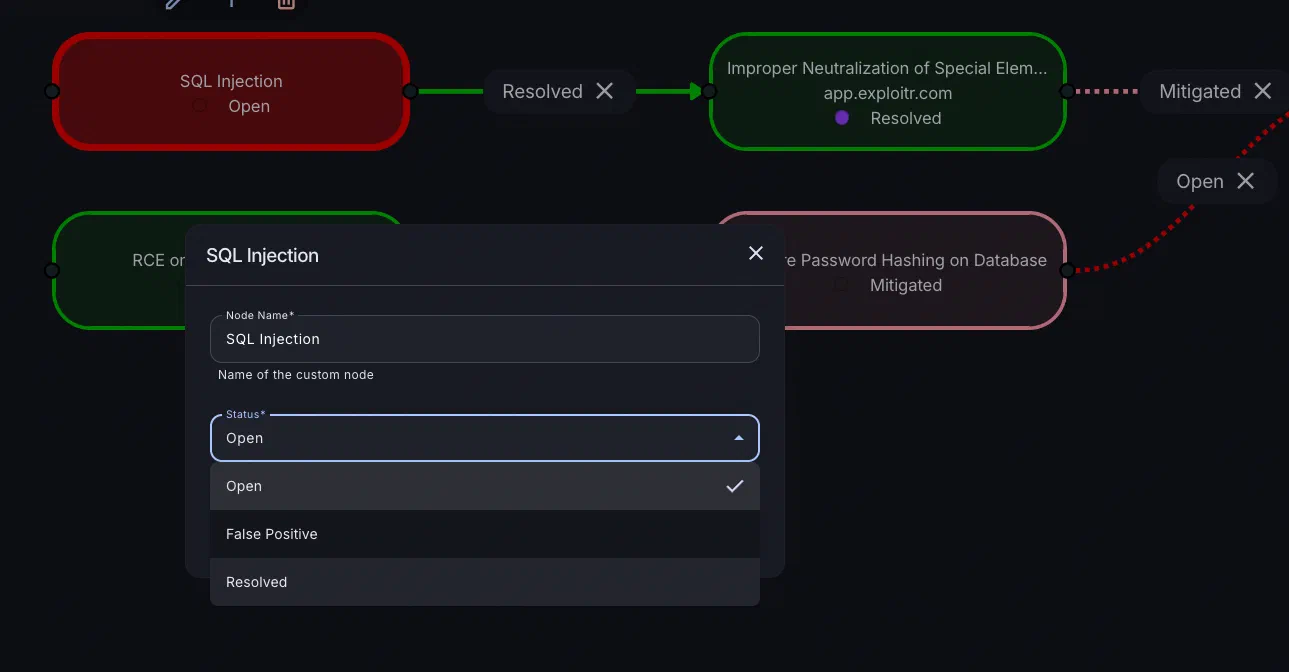
Once your attack chain is built, share it with your team to start work on remediation. Team members can view relationships, identify the most critical paths, inspect vulnerability details, and update statuses directly within the graph view.
- Status tracking: Update the status of any vulnerability directly from the attack chain view, keeping the map updated as work progresses.
- Critical path identification: See at a glance which nodes, if remediated, would collapse the most attack paths. Focus effort on the highest-impact fixes first.
- Impact visibility: As vulnerabilities are resolved, the attack chain updates to reflect the remaining exposure, making it easy to see how remediation is reducing real risk.
Start mapping your attack paths
Sign up for free and see how your vulnerabilities connect. No credit card required.
Common questions
Attack Chain Mapping visualises the relationships between assets, vulnerabilities, and potential attack paths in your environment. Each node represents an asset or vulnerability; links between them represent a route of exploitation from one to another. This lets you see how individual findings combine into a realistic path to compromise.
Select the risks, assets, and vulnerabilities you want to include from your inventory. The system automatically creates a visual representation of their relationships. You can also manually add nodes and links, or create custom nodes to represent elements that aren’t tracked as formal vulnerabilities.
Yes. Once created, your team can view relationships, identify critical paths, inspect individual vulnerability details, and update remediation statuses directly within the chain. Adding or modifying links is done by dragging and dropping nodes, or through the context menu.
An attack chain is a sequence of connected vulnerabilities that gives an attacker a route from an initial foothold to a specific objective. Rather than treating vulnerabilities as isolated findings, an attack chain maps how individual weaknesses can be exploited in sequence to reach a target, such as a sensitive database or a privileged account.
Understanding which vulnerabilities form a chain helps security teams prioritise remediation where it has the greatest impact on real-world risk.
The cyber kill chain is a model describing the general stages an attacker moves through, from initial reconnaissance through to achieving their objective.
An attack chain, by contrast, is specific to your environment: it maps the actual vulnerabilities and assets that an attacker could exploit to move through those stages within your infrastructure.
The kill chain describes the general playbook; an attack chain shows how that playbook applies to your specific systems.
Attack Chain Mapping is available on Standard plans and above. See our pricing page for a full feature comparison.